PilotOS Guided product tourSee what PilotOS
Take a look inside PilotOS
See what PilotOS
can do for your ISO.
See how PilotOS helps you manage applications, look after merchants and run your partner network. Choose a screen, then zoom in on the details that matter to your team.
6 guided stopsReal product screensDemonstration data
01 06 · Sales → operations
See which applications need attention.
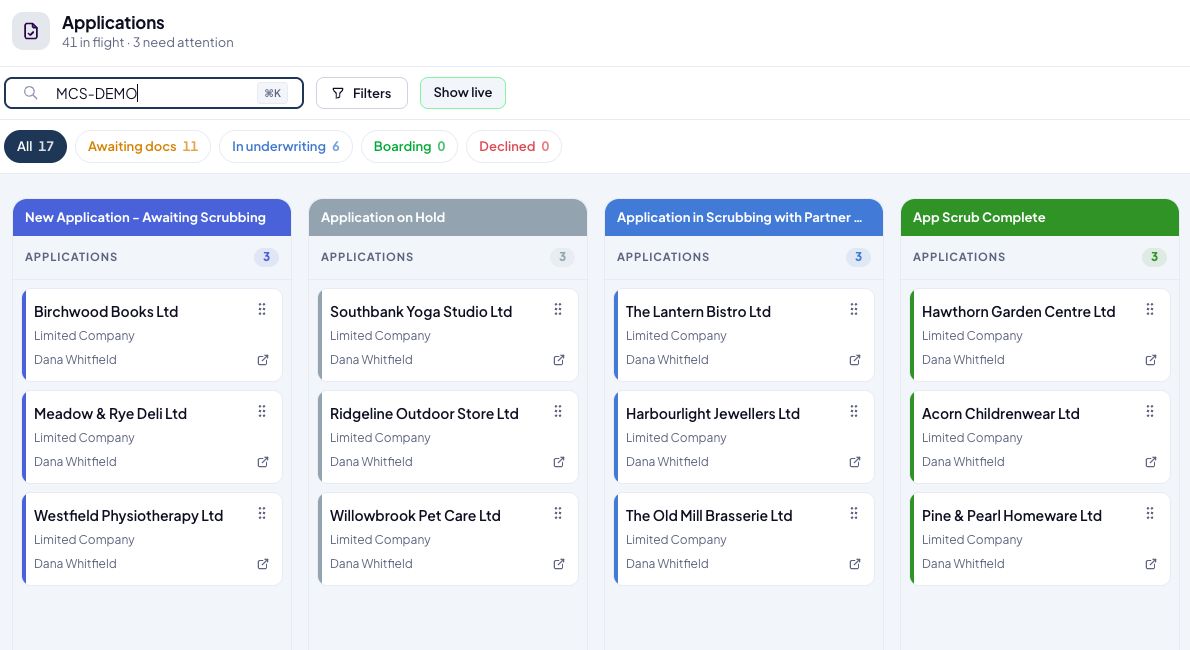
An application on hold needs a different follow-up from one ready for review. See the stage and assigned owner on each card, so your team knows what to pick up next.
Application workflowMeridian demonstration environment
Look closer
Choose a detail to inspectSpot the hold-ups before your next team call.
The board separates applications awaiting scrubbing, those on hold, those with a partner and those that have completed scrubbing. Review the queue by stage without opening every application.
Why it matters
Focus the team’s follow-up on the applications that need work to move forward.
Detail from the screen above
Screens show separate sample records across the platform.